
Unit 1
Organization of Files
1.1Unit Overview
- In Grade 9 you learned about files, folders, ways of creating and renaming them, and ways of accessing drives.
- This unit takes file management further: storage drives and drive letters, file name extensions, the directory structure and file paths, file conversion, importing and exporting, saving and opening files in different formats, backup and recovery, compression, and deleting and restoring files.
🎯 Learning Outcomes
- Explain the file management system.
- Analyze extensions of file types.
- Organize, delete and restore files and folders.
- Summarize file formats.
- Convert a file into different formats.
1.2 File Management
- Before automation, schools and other organizations kept their sensitive data in traditional filing systems such as filing cabinets.
- Such systems make files complicated to access.
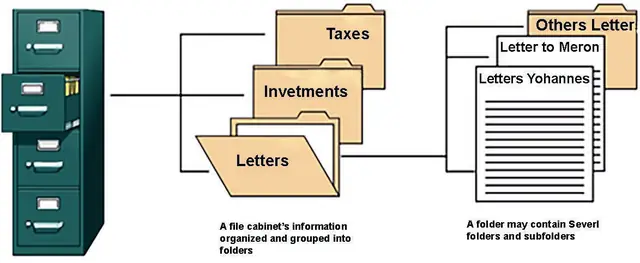
- To understand file management, you need to understand how a computer stores information.
- A file is the common storage unit in a computer: all programs and data are written into and read from files.
- Files are organized and grouped in folders and stored on disks.
- Computers rely on hard disk drives (HDDs) to store data permanently, so that digital information can be saved and retrieved for future reference.
- A disk drive is a technology that enables the reading, writing, deleting and modifying of data on a computer storage disk.
- It is a built-in or external component that manages the disk's input/output (I/O) operations.
- The most common type is the hard disk drive, and the two terms are often used interchangeably.
- Other types include optical drives and floppy drives.
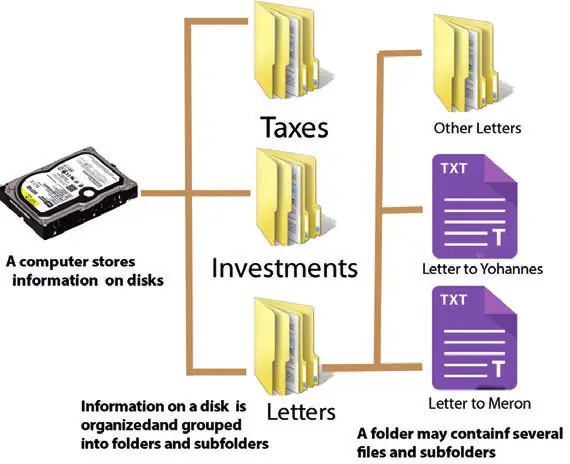
- A folder holds one or more files, and it can be empty until it is filled.
- A folder can also contain other folders, and there can be many levels of folders within folders.
- Files are organized into directories so that they are easy to locate and use.
- When several users have access to files, it may be necessary to control by whom and in what ways the files may be accessed.
Definition: File management — The process of creating an organized structure in which information is stored for easy retrieval: organizing and keeping track of files and folders.
Definition: Folder (directory) — A virtual storage space used to store and organize computer files.
🔒
The rest of Unit 1 is in the Danulearn app
Read the full notes for all 11 sections, worked examples and figures, plus 6 exercises with step-by-step solutions, the Short Note and the unit review.
📑 Contents
- 1.2File ManagementPreview
- 1.3Storage Drives🔒
- 1.4File Name Extension🔒
- 1.5File Directory Structure🔒
- 1.6File Conversion🔒
- 1.7File Importing and Exporting🔒
- 1.8Saving and Opening Files🔒
- 1.9File Backup and Recovery🔒
- 1.10File Compression🔒
- 1.11Deleting a File🔒
- 1.12Restoring Deleted File🔒