
Unit 3
Database Management System
Introduction
- Almost all information today is stored in databases.
- In Grade 11 you learned that databases are how organizations manage their data, and you learned how to design one.
- A database has a data model that determines how data can be stored, organized and manipulated.
- This unit moves from design to creation.
- It reviews the relational database management system and then shows how SQL (Structured Query Language) is used to create tables, to manipulate the records in them and to query them.
🎯 Learning Outcomes
- Describe a relational database management system.
- Explain fields and records.
- Apply SQL data definition language (DDL) to create tables in a database.
- Differentiate between SQL data definition language (DDL), data manipulation language (DML) and data query language (DQL).
- Apply SQL DML to manipulate records in tables.
- Apply SQL DQL to query records of tables.
3.1 Overview of Relational Database Management System
- A Relational Database Management System (RDBMS) is software developed to manage databases.
- It is used to create, maintain and provide controlled access to a relational database.
- A relational database is based on the relational data model.
- Data is stored in two-dimensional tables made of columns (fields) and rows (records).
- Each column represents an attribute, and each row represents a tuple or record.
- A database contains one or more tables.
- Attributes are the set of properties that describe the instances of an entity.
- A student, for example, is an entity whose attributes are student id, name, age, grade level and sex.
- A record is one row of the table and holds a single data value in each column.
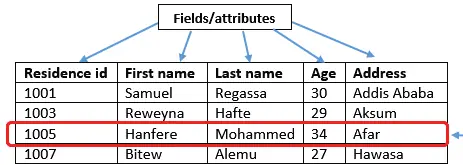
- Every field in a table must be given a name and a data type.
- The data type is the kind of value the field stores.
- A residence id written as a four-digit number is numeric; a first name is text.
| Field | Data type | Example value |
|---|---|---|
| Age | Integer | 19 |
| Name | Text | Abdu |
| Price | Real or currency | 32.5 |
| Date of birth | Date | 10/12/2008 |
| Height | Integer or real | 175 or 165.6 |
| Grade level | Integer | 11 or 12 |
| Telephone number | Text | +251 900 00 00 00 |
- Every DBMS provides data types to choose from.
- In Microsoft Access, when you create a table you specify the type of each field: text, integer, real number, date, currency, or yes/no.
🔒
The rest of Unit 3 is in the Danulearn app
Read the full notes for all 2 sections, worked examples and figures, plus 11 exercises with step-by-step solutions, the Short Note and the unit review.
📑 Contents
- 3.1Overview of Relational Database Management SystemPreview
- 3.2Database Manipulation Using SQL🔒