
Unit 3
Database Management
Introduction
- Database management is a way of organizing data so that it can be stored, found and kept correct with little effort.
- This unit compares the older file-based approach with the database approach, explains how a database is planned with a data model and drawn as an entity relationship diagram, and then shows how to build a relational database in Microsoft Access: creating the database, its tables and its queries.
🎯 Learning Outcomes
- Define database.
- Explain data models.
- Describe data management approaches.
- Recognize database entities, attributes and relationships.
- Develop data models with an entity relationship diagram (ERD).
- Create and manage databases using Microsoft Access.
3.1 Data Management Approaches
- Data management is part of daily life.
- Data used to be managed by hand on paper.
- As the amount of data grew, computers became essential for managing it efficiently.
- The first computer-based method was the file-based approach.
- The database approach came later and removed its weaknesses.
3.1.1File-Based Data Management
- In file-based data management, data is stored in separate files with no explicit relationship between them.
- Each file is managed by its own application program.
- Any change to the data requires a change to the program that uses it, and a change to the program may require a change to the structure of the file.
- Each department, such as procurement or finance, creates and processes its own files.
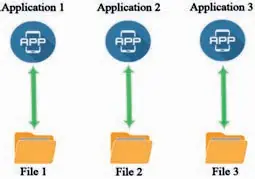
- This approach causes data duplication and data inconsistency.
- Suppose employee data is stored in both the human resource department and the finance department.
- When human resources changes the records after hiring new staff, it may not tell finance, so the same organization holds different information about its employees.
- The contradiction arises because data in one file is not linked to data in another.
- This isolation also makes it very hard to retrieve data for the whole organization.
🔒
The rest of Unit 3 is in the Danulearn app
Read the full notes for all 3 sections, worked examples and figures, plus 9 exercises with step-by-step solutions, the Short Note and the unit review.
📑 Contents
- 3.1Data Management ApproachesPreview
- 3.2Data Model🔒
- 3.3Creating a Relational Database in Microsoft Access🔒